Showing posts with label Web Design. Show all posts

Wednesday, April 26, 2017

12 Tips for Designing a Clean and Attractive Website


Being a successful web designer is no longer about simply having technical skills. You’ll need to have a keen visual eye and be up to date on trends. While keeping the pulse on emerging styles is key, incorporating analytics and testing will make you invaluable. Let’s discuss 12 keys elements to designing a website that will keep your viewers engaged. It’s time to make this your most successful design year ever. So let's get started with the tips that would help you design a cleaner and attractive looking website. You would also like to see some great examples of web design for your inspiration.

1. A Professional Logo

Your logo is a huge part of your company’s brand and should be in a prominent location on every page. Design your logo with a simple, timeless design and it will never look out of place throughout your website.

This is a great logo that is simple yet clear and will look great in both black and white. 

2. Use Mostly Neutral Colors

Use a neutral color palette to help your site look clean and elegant. If you want to create a dramatic effect, add splashes of vibrant color to emphasize elements you want to make pop. 

Using a white background allows you to emphasize your product and maintain a clean, modern feel.

3. Make Every Page as Interesting as Your Homepage

Often, designers focus most of their energy on the homepage and allow the rest of the pages look secondary. Every page should have the same attention to detail. 

4. Loud and Clear Fonts

Fonts on websites are getting bigger. Allow yourself space to use fewer words and bolder ideas. Use typography that’s easy to read over frilly or trendy fonts. 

5. Declutter

Get rid of sidebars, lengthy descriptions, and too many menu items. Simplify everything.

6. Leave Room to Breathe

Leave more room in between content and give your visitor a chance to breathe. Don’t be afraid of empty spaces and gaps after headlines and between paragraphs.

7. Professional Photography

Invest in high-quality photography that is unique to your business. Often clean, simple photography is the most powerful tool on a homepage. 

8. Logical Navigation

Nothing makes users click away faster than navigation that doesn’t make sense. Make sure to have a contact button, FAQs, and your social media icons in the footer of every single page as well.
Design can become repetitive when people overuse a template or resource. Use graphic design software like CorelDraw Graphics Suite that allows you to design websites not seen anywhere else on the web.

10. Clear Call to Action

Your website has a purpose - make sure it is clear. Have a call to action that is obvious but not obnoxious. Instead of making a “contact us” button in the upper right-hand corner, consider having the call to action be an entire section at the bottom of each page.

11. Responsive Design is a Must

Your website must look great on every device - desktops, laptops, tablets, and phones.

12. A/B Testing

If you aren’t already using A/B testing on your web designs, this is a skill you should incorporate immediately. A/B Testing with website design has earned some companies tremendous returns -- even for something as simple as changing the shade of blue.

7 Easiest Ways to Improve Your Conversion Rate


Are you not getting proper conversion rate with your website traffic and visitors? Do you have a poor navigation
If your web design isn’t driving people to the right spot or isn’t converting – what are some of the things you can do to push people in that direction? Yes, you might know A/B testing entire new designs is possible, but perhaps you don’t have the time. Here are 10 things you can do right now to try to get that number of conversions up. You might also love to read a great web design guide on increasing conversions of eCommerce websites. So let's improve your conversion rate.


Testimonials are important


Add testimonials and pictures of happy customers around the site. People are much more likely to do business with you when they see real people have enjoyed working with you in the past, or have enjoyed your products. You may understand that your work is amazing – but people don’t have the same experiences as you, they aren’t going to psychically understand the value of your work, you need to spell it out for them with dead-simple testimonials. Check my own client reviews here.

Add Trust Badges


Add two or three trust badges around the site, particularly where you are wanting people to take a next action like contacting or going to the contact page – or placing an item in their cart.

HUMANIZE it

Take some time to HUMANIZE the key marketing messages you have and don’t let ‘corporate-ese’ take over and strangle the way your website is talking to potential customers.

Take Photography Seriously

Take some time and refresh your photography to be the closest thing to real, genuine people enjoying the benefits of your product or service as you possibly can. Consider the story of a successful interaction with your company and what that means for your customers. Consider the emotional impact you have on them, and try to demonstrate that through high quality and authentic photography. If you don’t currently have these photos – the next chunk of marketing money you spend should be on professional photography and it should be done under the careful creative direction of someone who understands your brand and what your brand means to customers.


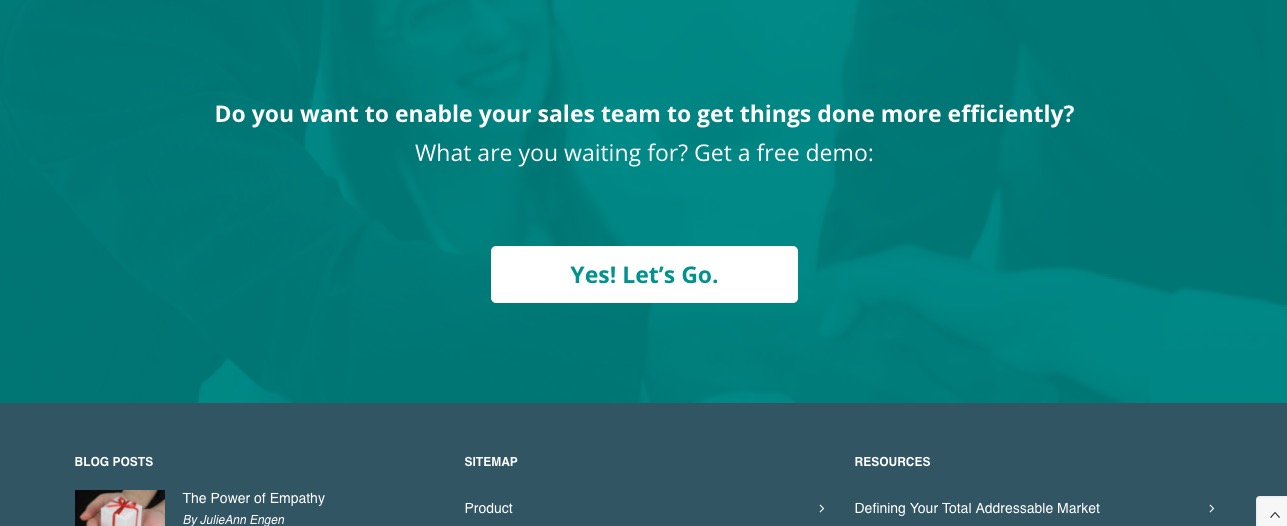
Example from Oppsource - Sales Development

Have as many CTA as Possible

Add a full-width CTA (or call to action) section above the footer on every page. If you have a developer handy, have them develop it so it’s actually in the file for your footer so you don’t have to manually add it to every page. With WordPress or other CMS or a website using PHP, this will be relatively easy to a developer.

Simplify your contact form

Take away a couple fields from your contact form – if you have only 3 this would obviously not be practical, but if you have 10, consider that people might be too much in a hurry to give you every last detail of their lives just to be able to talk to you. It may make it easier on you if they give you all that info, but the current state of the world is such that if you need more leads / if you really want your conversion rate to improve, you’re going to need to ask for less out of the gate. Consider having a pre-made e-mail written and ready to send with the next 3 questions – there’s nothing wrong with a two-step approach.

Create Urgency

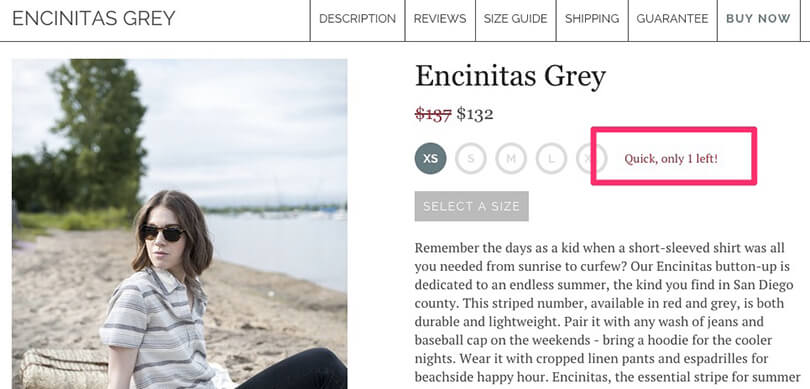
Create some kind of urgency with an indication that your product or service has a limited quantity or stoke the feeling of scarcity in some way. People use countdown timers, limited time pricing, or an indication that they only have 2 or 3 slots left in the next couple months if they are selling services to push people to make a decision NOW. 


Example from Shopify’s “Ways to Create Urgency

Conclusion

I hope you these tips was helpful for you to improve your conversion rate. Do you have any tips that helped you achieve great conversion rate? Add your thoughts in the comments section below.

3 Tips to Get Started and Learn Web Design More Effectively


Have you decided that you want to learn how to design websites? That’s great – but the very next thing you’re probably going to wonder about is how you can go about doing just that.
Nowadays there are many different ways to learn web design, and numerous approaches and skillsets that are involved. While there is no single ‘best’ way to get started, these tips will help put you on the right track and let you learn more effectively:

  • Start with the basics
While it may be tempting to immediately jump into a WYSIWYG editor (such as Dreamweaver or Photoshop) and start designing, it is often best to learn the basics first. Finding out more about HTML and CSS in particular will help you to understand how websites and web design work – even if you don’t go too in-depth when learning about it.

  • Play to your strengths
After you have a decent understanding of the basics, you should continue by playing to your strengths. If you have experience in graphic design or other art then WYSIWYG editors might help to jumpstart your experience. On the other hand if you have experience with code then learning CSS, JS, and other languages associated with web design might be an easier starting point.

  • Structure vs. free learning
The main decision you may have to make is whether to follow a structured web design course (paid or free), or simply research and learn from various resources as and when you need to. That is really a matter of preference, and it is solely up to you to decide which approach you’d prefer. If you like having a structure that you can follow then go with it, but if you prefer being able to learn what you need to by yourself then that’s fine too.


If you find that some of the video lessons and guides available online are an excellent resource you could record and save them on your PC with Movavi Screen Capture. It is an easy-to-use screen recorder that will let you record screen video.

Rest assured it isn’t difficult to set it up, and you can immediately launch Movavi Screen Capture and draw a frame over the video using the mouse cursor. After that you need only press the record button and then stop and save it when it is done.

With the features in Movavi Screen Capture you can set the recording parameters to suit any requirements. That includes setting the frame rate, capture frame, audio source, and even choosing whether or not to record keyboard and mouse actions. In fact there is even a scheduler that will let you automatically start and stop the recording at a particular time.

Suffice to say Movavi Screen Capture will give you all the flexibility you need to save helpful web design guides, presentations, or even webinars for easy reference. If you think that would help, why not launch it right now and get started.